Gemini 3.1 Coding Test: I Built a 3D WebGL Racing Game in Three.js — AI Added Audio Synth & Minimap Nobody Asked For

I put Gemini 3.1 Pro to the test as a free coding ai tool to see if it qualifies as the best coding ai for browser game dev: one prompt to build a complete 3D arcade racing game in a single HTML file using Three.js, no frameworks, no external assets. The base build came back working on the first try. Getting it fully polished took five more rounds of bug fixes, one of which was a regression the model introduced while fixing something else.
The AI coding tool prompt: What I asked for
Building a complete webgl game in one file is a stringent test of spatial reasoning and physics architecture. The goal: a self-contained Three.js car game that opens by double-clicking index.html, no build steps, no external dependencies — a direct llm coding benchmark for agentic code generation.
You are an expert Three.js game developer.
Build a complete 3D arcade racing game in ONE SINGLE HTML file using Three.js (load from CDN, no other libraries, no build tools, no external assets).
IMPORTANT:
- Output ONLY one file: index.html
- Put all HTML, CSS, and JavaScript inside this single file
- Do not create any other files
- Do not use React, TypeScript, or any frameworks
- The final file must run by double-clicking index.html
TRACK:
- A closed-loop race track built from simple geometry (a ribbon/road mesh or connected segments), with visible track boundaries so the player can tell where the drivable surface ends
- At least a few curves and a couple of elevation changes or chicanes so it isn't just an oval
- Simple scenery around the track (trees, barriers, or similar low-poly objects) so the world doesn't feel empty
PLAYER CAR:
- Third-person chase camera that follows the car smoothly
- Arcade-style driving physics: acceleration, braking, steering, and some drift/slide when turning at speed (does not need to be a full physics engine — a simplified arcade model is fine)
- Controls: W/Up = accelerate, S/Down = brake/reverse, A/D or Left/Right = steer
- Visual feedback for speed (camera FOV shift, motion blur, or particle trail are all acceptable — pick one)
RACE:
- 3 AI-controlled opponent cars that follow the track using waypoints or a similar simple path-following method, at varying speeds
- Lap counting: track when the player crosses the start/finish line, count laps, and finish the race after 3 laps
- A basic position indicator (1st/2nd/3rd/4th) that updates as cars pass each other
UI:
- HUD showing current lap (e.g. "Lap 2/3"), position, and speed
- Race countdown at the start (3, 2, 1, GO)
- End-of-race screen showing final position, with a restart button
CODE: everything inside <script> and <style> tags. No explanations. No
markdown. No separate files. Return only the complete index.html code,
loading Three.js from a CDN script tag.
Round one: base generation
The prompt came back with a track, car, AI opponents, and HUD all rendering immediately — but the countdown's "GO!" text stayed stuck on screen after the race started, sitting on top of the gameplay view instead of fading out.
Round two: camera and alignment
Fixing the GO-text overlay surfaced two more issues that needed their own follow-ups: the chase camera started pointed off to the side instead of behind the car, and separately, the car itself wasn't aligned with the road at spawn — it sat at an angle instead of facing straight down the first straight, visibly spinning during the fix before settling into place.
Round three: controls and a regression
Once the car was aligned, A/D and the arrow keys turned out to be swapped — pressing left turned the car right and vice versa. Fixing that broke something that had been working: the road mesh itself stopped rendering, a regression in a system unrelated to what was being changed. A follow-up fix restored it. One more pass was needed after that to fix the start/finish arch, which was misaligned with the road's actual heading and was effectively blocking the drivable surface instead of sitting cleanly over it.
By the end of six total rounds, the car spawned straight, controls matched the requested bindings, the road rendered, and the finish arch sat correctly over the track.
Interactive Demo
W A S D / Arrow Keys to drive
It's a real, self-contained index.html — no build step, no server, opens by double-click exactly as instructed.
What the final build delivered: Gemini 3.1 Pro benchmark results
Player car and driving feel
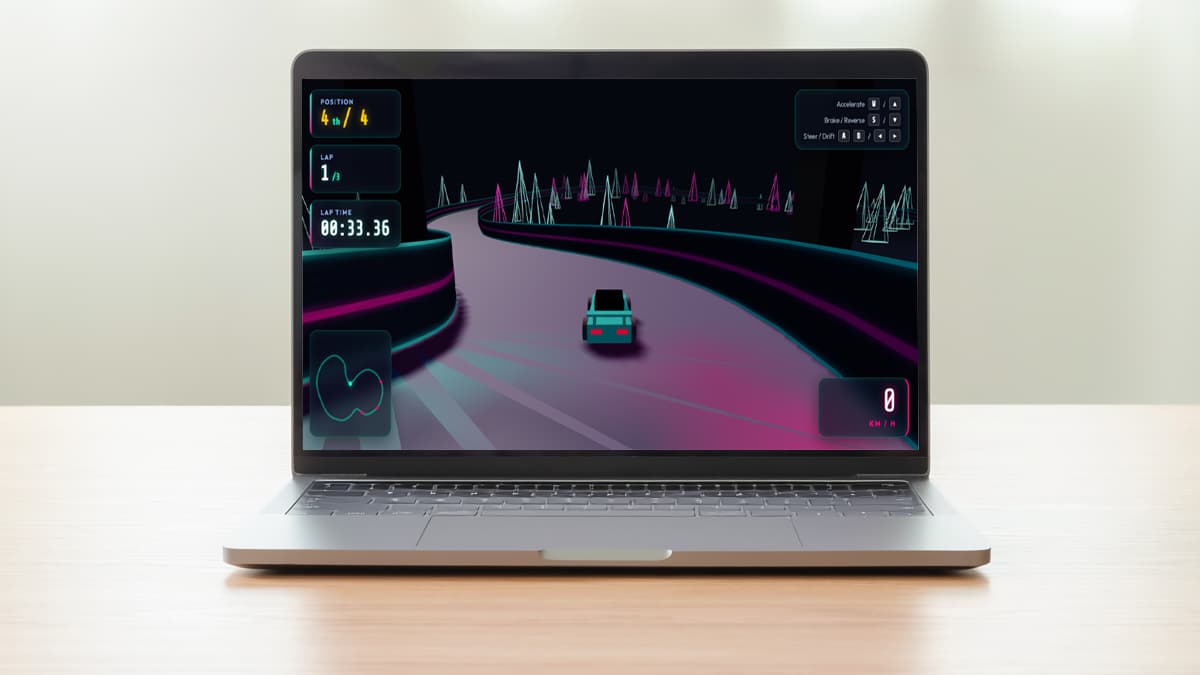
The car model is built entirely from primitives — a wedge body, a dark cabin box, a glowing rim strip, a rear spoiler with struts, and four cylinder wheels with a colored inner rim — no external model or texture. Driving physics live in a Car class shared by player and AI: acceleration and braking are simple scalar ramps, and drift is handled by lerping a driftAngle toward a steering-derived target whenever you're steering hard above roughly 55% of top speed while braking or holding space, with a small speed penalty while drifting.
AI opponents
The three AI cars use a lightweight lookahead: each one samples the track tangent slightly ahead of its current position, compares it to its current heading, and slows proportionally to how sharp the upcoming curve is. Each AI also has its own aiSpeedFactor (0.9–1.05x) baked in at spawn, so they don't all lap at identical pace, and they occasionally re-target a random lateral offset to weave rather than driving a single fixed line.
Track and environment
The track itself isn't a flat ribbon — the 17 CatmullRomCurve3 control points vary in Y from -8 to 32, so there's real climbing and descending built into the loop, not just a top-down curve. Track and wall geometry are hand-built BufferGeometry meshes generated by walking the curve in 800 segments and extruding left/right edges, rather than using a primitive tube or plane. Scenery is 160 wireframe cone "trees" in alternating cyan/magenta scattered along both sides of the track at randomized offsets and heights.
Unprompted additions
Two things showed up that weren't anywhere in the prompt. The first is a full SoundManager class wired to the Web Audio API — not a placeholder beep, but an actual signal chain: a sawtooth oscillator through a lowpass filter for engine hum (pitch and gain scale continuously with speed), plus a separate looping noise buffer through a bandpass filter for tire screech that fades in once drift intensity crosses a threshold. The second is a canvas-based radar minimap in the bottom-left HUD, tracing the track outline and plotting all four cars as dots in real time — genuinely useful in play given how much the track curves, not just decorative. Our own game-build template specifically notes that minimaps haven't shown up unprompted in prior tests (GLM-5.2, Gemini 3.6 Flash) — this is the first time we've seen a model add one on its own.
UI and HUD
The HUD shows position (with ordinal suffix), current lap out of 3, a running lap timer, and a speedometer in km/h, all in a glassmorphism panel style with neon cyan/magenta accents. The countdown does a scaled/faded "3, 2, 1, GO!" sequence with a beep on each tick, and the results screen shows final position, total time, and best lap with a restart button that resets all four cars' track position, lap count, and speed. The track-following math holds up well throughout — position, orientation, and camera all derive from the same tangent/normal frame at parameter t, which is why the eventual alignment fix (rebuilding the car's rotation from right/normal/back basis vectors) was a clean, isolated change rather than a patch bolted on top of broken math.
What's missing
- The base one-shot output was not launch-ready. Between the GO-text bug, the sideways camera, the car spawning misaligned, and inverted steering, most of the six fix rounds were addressing problems present in the very first generation — this wasn't a polished first pass.
- One fix broke a working system. Fixing the inverted controls caused the road mesh to stop rendering in the next round — a genuine regression, not a pre-existing bug, introduced while editing an unrelated part of the code.
- The start/finish arch needed a second geometry pass. Even after the car-alignment fix used correct tangent-based orientation, the lap gate arch was still misaligned with the road heading and had to be corrected separately.
- No sound toggle or volume control despite the added audio system — engine and screech sound start on first keypress via
AudioContextand have no mute button.
Honest assessment
Try it yourself
You are an expert Three.js game developer.
Build a complete 3D arcade racing game in ONE SINGLE HTML file using Three.js (load from CDN, no other libraries, no build tools, no external assets).
IMPORTANT:
- Output ONLY one file: index.html
- Put all HTML, CSS, and JavaScript inside this single file
- Do not create any other files
- Do not use React, TypeScript, or any frameworks
- The final file must run by double-clicking index.html
TRACK:
- A closed-loop race track built from simple geometry (a ribbon/road mesh or connected segments), with visible track boundaries so the player can tell where the drivable surface ends
- At least a few curves and a couple of elevation changes or chicanes so it isn't just an oval
- Simple scenery around the track (trees, barriers, or similar low-poly objects) so the world doesn't feel empty
PLAYER CAR:
- Third-person chase camera that follows the car smoothly
- Arcade-style driving physics: acceleration, braking, steering, and some drift/slide when turning at speed (does not need to be a full physics engine — a simplified arcade model is fine)
- Controls: W/Up = accelerate, S/Down = brake/reverse, A/D or Left/Right = steer
- Visual feedback for speed (camera FOV shift, motion blur, or particle trail are all acceptable — pick one)
RACE:
- 3 AI-controlled opponent cars that follow the track using waypoints or a similar simple path-following method, at varying speeds
- Lap counting: track when the player crosses the start/finish line, count laps, and finish the race after 3 laps
- A basic position indicator (1st/2nd/3rd/4th) that updates as cars pass each other
UI:
- HUD showing current lap (e.g. "Lap 2/3"), position, and speed
- Race countdown at the start (3, 2, 1, GO)
- End-of-race screen showing final position, with a restart button
CODE: everything inside <script> and <style> tags. No explanations. No
markdown. No separate files. Return only the complete index.html code,
loading Three.js from a CDN script tag.