I prompted Gemini 3.6 Flash to build a 3D voxel survival shooter — controls were inverted on low effort, solid on high

I put the new gemini 3.6 model to the test with a hands-on gemini game dev evaluation: build a complete 3D voxel survival shooter in a single HTML file using Three.js, no build tools, no external assets. I ran the prompt twice — once on low reasoning effort, once on high — to see how much the thinking budget actually changes the output. It changed more than I expected.
What I asked for: Voxel survival game prompt
Build a complete 3D survival game in a single HTML file using Three.js (load from CDN, no build tools).
Requirements:
- First-person camera with WASD movement + mouse look, pointer lock
- A procedurally generated 3D voxel-style arena (cubes) with some obstacles/cover
- Enemies (simple colored capsules or cubes) that spawn in waves and chase the player using basic pathfinding or direct-line movement
- Player has health and a simple shooting mechanic (raycast from camera, hits deal damage, visual feedback on hit)
- Score/wave counter UI overlay
- Game over screen with restart
- Everything in one .html file, no external assets except the Three.js CDN script
Output the complete file only.
Round one: low effort
On the low reasoning-effort setting, Gemini 3.6 Flash returned a working game fast — arena generated, enemies spawned, waves counted up, health bar ticked down on contact. But the mouse look was inverted: pushing the mouse up rotated the camera down, and left/right was similarly flipped. I didn't dig further into whether other systems had issues, since an inverted camera makes a first-person shooter close to unplayable on its own, and it was a clean enough signal to just switch effort levels rather than debug it.
Round two: high effort, same prompt
Same prompt, no edits, effort setting switched to high. This time the camera tracked correctly, and two things showed up that weren't explicitly asked for in the prompt: sprint (Shift) alongside walk, and a visible weapon model with muzzle animation.
Interactive Demo
W A S D / Arrow Keys to drive
Gemini 3.6 Flash high effort benchmark results
Start screen and controls
The start screen shipped with a full control legend unprompted — WASD, mouse, left click to shoot, space to jump, shift to sprint, and Esc to unlock the cursor. None of that layout detail was in the prompt; the model inferred a reasonable onboarding screen for a shooter on its own.
Combat feel
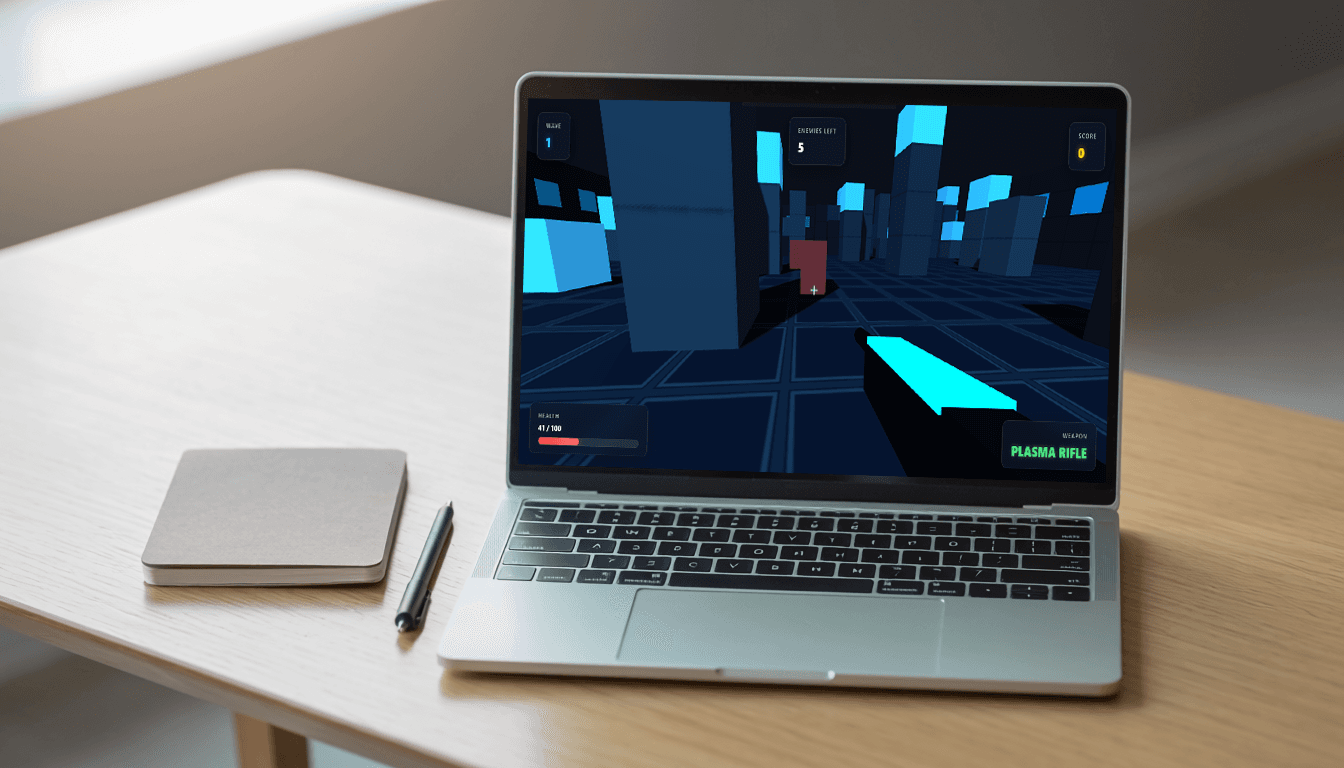
The gun itself is the standout part of this generation. It wasn't asked for beyond "shooting mechanic," but Gemini added a rendered plasma rifle model with a cyan glow strip, a muzzle-flash point light, and visible recoil animation on fire. Firing also triggers a gunshot sound effect, none of which was explicitly requested. Hits register with a crosshair reticle and enemy color-flash feedback — in my test run, an enemy at close range showed a clear red hit-flash after being tagged by the raycast.
Audio wasn't part of the prompt at all, but Gemini added a small sound layer on top of the visuals anyway: a cue on the start screen, another on pause, and a warning sound that plays when an enemy gets too close to the player — a nice touch for a wave-survival loop where enemies can close distance behind cover.
Arena and enemies
The voxel arena generates as blocky cube clusters with varying heights, giving genuine cover to duck behind rather than an open flat room. Enemies spawn in waves (the HUD showed "Wave 1" with 5 enemies remaining in my session) and path directly toward the player — nothing fancy like real pathfinding around obstacles, but functional chase behavior that closes distance and forces movement.
What's missing
- No minimap — GLM-5.2's zombie survival test had a similarly cube-based enemy design but no minimap either, so this isn't a regression against that specific comparison, but it's a feature I'd want for wave-based arena combat where enemies can spawn behind cover
- No hit or wave-transition sound — audio covers the gunshot, start screen, pause, and an enemy-proximity warning, but there's no dedicated sound for landing a hit or starting a new wave
- Low-effort output shipped with inverted mouse controls that needed a full effort-level switch to resolve, not a small fix
Honest assessment
Try it yourself
Build a complete 3D survival game in a single HTML file using Three.js (load from CDN, no build tools).
Requirements:
- First-person camera with WASD movement + mouse look, pointer lock
- A procedurally generated 3D voxel-style arena (cubes) with some obstacles/cover
- Enemies (simple colored capsules or cubes) that spawn in waves and chase the player using basic pathfinding or direct-line movement
- Player has health and a simple shooting mechanic (raycast from camera, hits deal damage, visual feedback on hit)
- Score/wave counter UI overlay
- Game over screen with restart
- Everything in one .html file, no external assets except the Three.js CDN script
Output the complete file only.