I Prompted GLM-5.2 on Max Effort to Build a 3D Open-World Survival Game — It Nailed It in One Prompt


I put GLM-5.2 (Z.ai's 753B open-weight Mixture-of-Experts model) to the test with a hands-on glm 5.2 coding evaluation: build a complete three js open world survival game in a single HTML file on the first try, with no external assets, no frameworks, and a real procedurally generated world the player can walk across freely. It came back with 1,014 lines of working code on the first attempt — custom noise math, instanced trees, a 120-second day/night cycle, hit-flash harvesting, and a ghost-mesh placement system for shelter walls and campfires. No syntax errors, no broken imports, nothing that needed a follow-up fix.
What I asked for: GLM-5.2 survival game prompt
The prompt was designed to hit several hard requirements at once: custom terrain math with no external library, instanced geometry for vegetation, first-person collision, and a full survival loop inside a single file.
You are an expert Three.js game developer.
Create a complete first-person open-world survival game in ONE SINGLE HTML FILE.
IMPORTANT:
- Output ONLY one file: index.html
- Put all HTML, CSS, and JavaScript inside this single file.
- Do not create any other files.
- Do not use external assets.
- Do not use React, TypeScript, or any frameworks.
- Use only Three.js from CDN.
- The final file must run by double-clicking index.html.
- This must be a real 3D open world with procedurally generated terrain the player can freely walk across in any direction — NOT a fixed arena, NOT a flat plane with no elevation, NOT a bounded room.
WORLD GENERATION:
- Procedurally generate terrain using Perlin/Simplex-style noise (implement a simple noise function yourself if no external library is allowed) to create rolling hills and varied elevation across a large playable area (at least several hundred units in each direction)
- Generate at least 2-3 distinct biome zones based on noise/position (e.g. grassland, forest, rocky/mountain, desert or snow) with different ground colors and different vegetation density
- Scatter 3D vegetation/props appropriate to each biome: trees (trunk + foliage from primitives), rocks, bushes — these must be harvestable resource nodes (see RESOURCES)
- Terrain should extend far enough that the player doesn't hit an obvious edge during normal play; simple fog in the distance is fine to hide the horizon/pop-in
CAMERA & PLAYER:
- First-person camera at player eye height, mouse-look with pointer lock (look up/down and turn left/right)
- Player collides with terrain height (walks on the ground surface, terrain elevation affects player Y position) and cannot walk through trees/rocks
- Controls:
- WASD: move (camera-relative), speed affected by terrain slope
- Space: jump
- Shift: sprint (drains stamina)
- Left click: interact / harvest resource / attack if holding a weapon
- E: open inventory/crafting menu
- Mouse: look
SURVIVAL STATS:
- Health (0-100): drops from hunger reaching 0, fall damage, or enemy contact if any hostile creatures are present
- Hunger (0-100): decreases steadily over real time, must be replenished by eating food items
- Stamina (0-100): drains while sprinting/jumping, regenerates when idle/walking
- All three shown as UI bars (top-left), with hunger reaching 0 causing slow health drain
RESOURCES & CRAFTING:
- Harvestable nodes: trees give Wood (click/hold to chop, node depletes then respawns after a delay), rocks give Stone, bushes give Food (berries)
- Simple inventory: track item counts (Wood, Stone, Food, and any crafted items) in a UI panel (toggle with E)
- Crafting: at least 3 craftable items from gathered resources, e.g.:
- Campfire (Wood + Stone): placeable in the world, provides light at night, can cook/consume for hunger restoration
- Axe (Wood + Stone): equippable, increases wood-harvest speed/amount
- Simple shelter wall or torch (Wood): placeable, torch can be carried and lights the immediate area
- Crafting menu shows what's craftable based on current inventory (grey out items you don't have resources for)
DAY/NIGHT CYCLE:
- A real-time day/night cycle (a few minutes per full cycle is fine) with the sun/moon position moving and ambient lighting shifting color/intensity accordingly
- Visibly darker at night, light sources (campfire, torch, player-carried light) become meaningfully useful at night
WORLD INTERACTION FEEDBACK:
- Resource nodes show a hit-flash or shrink/particle effect when harvested
- Simple crosshair in the center of the screen, changes appearance when looking at an interactable object
- Brief on-screen text/toast when gaining items ("+3 Wood") or crafting something
UI:
- Health / Hunger / Stamina bars (top-left)
- Hotbar or inventory summary (bottom of screen)
- Crafting menu (toggle with E), clearly listing recipes and required resources
- Simple day/time indicator (top-right)
- Death screen if health reaches 0, with a restart button that regenerates the world
PERFORMANCE:
- Use simple/low-poly geometry and instancing or reasonable object counts for vegetation so the world doesn't tank framerate
- Reasonable draw distance with fog to mask terrain pop-in, don't attempt to render the entire world unbounded — generating a large-but-finite terrain area upfront is acceptable
- Target a playable framerate on a mid-range machine
Interactive Demo
W A S D / Arrow Keys to drive
This is GLM-5.2's unedited one-shot output. Click "Enter the Wild" to capture mouse lock and start exploring.
Procedural terrain and biomes
Instead of requesting external noise from simplex-noise or similar, GLM-5.2 wrote a self-contained SimpleNoise class directly into the script — a permuted lookup table with a fractal() function layering four octaves of Perlin noise. Terrain elevations are evaluated across a 600×600 plane with 150 segments per axis, giving hills, valleys, and mountain peaks without any external dependency.
Vertex colors shift with elevation: deep forest green (#2e5a22) in the lower grassland zones, lighter green for mid-elevation forest, granite grey (#8a8a7a) above the treeline, and white snow caps at the highest peaks. The biome color transitions aren't sharp-edged region boundaries — they follow the same noise that drives elevation, so grassland and forest blend naturally where the terrain does.
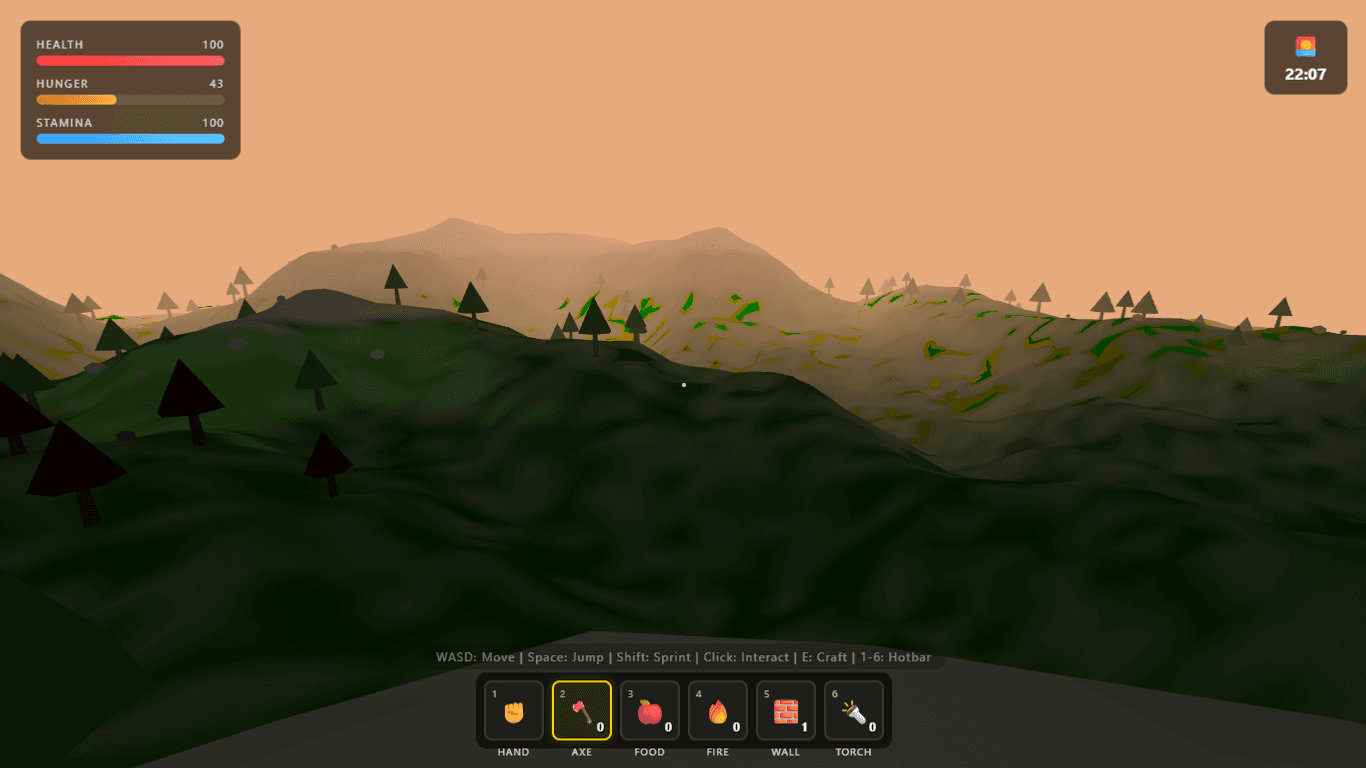 Procedural Noise Mountain Biome and Fog Horizon in GLM-5.2 Wilderness Survival
Day/night cycle
The sun is a DirectionalLight with a shadow map, orbiting on a sin/cos arc with a 120-second full cycle. Sky background color, fog color, and ambient light intensity all update each frame to match sun elevation — daytime is a clear blue, sunset goes orange, night drops to near-black. Placed campfires and a carried torch become genuinely necessary at night rather than decorative.
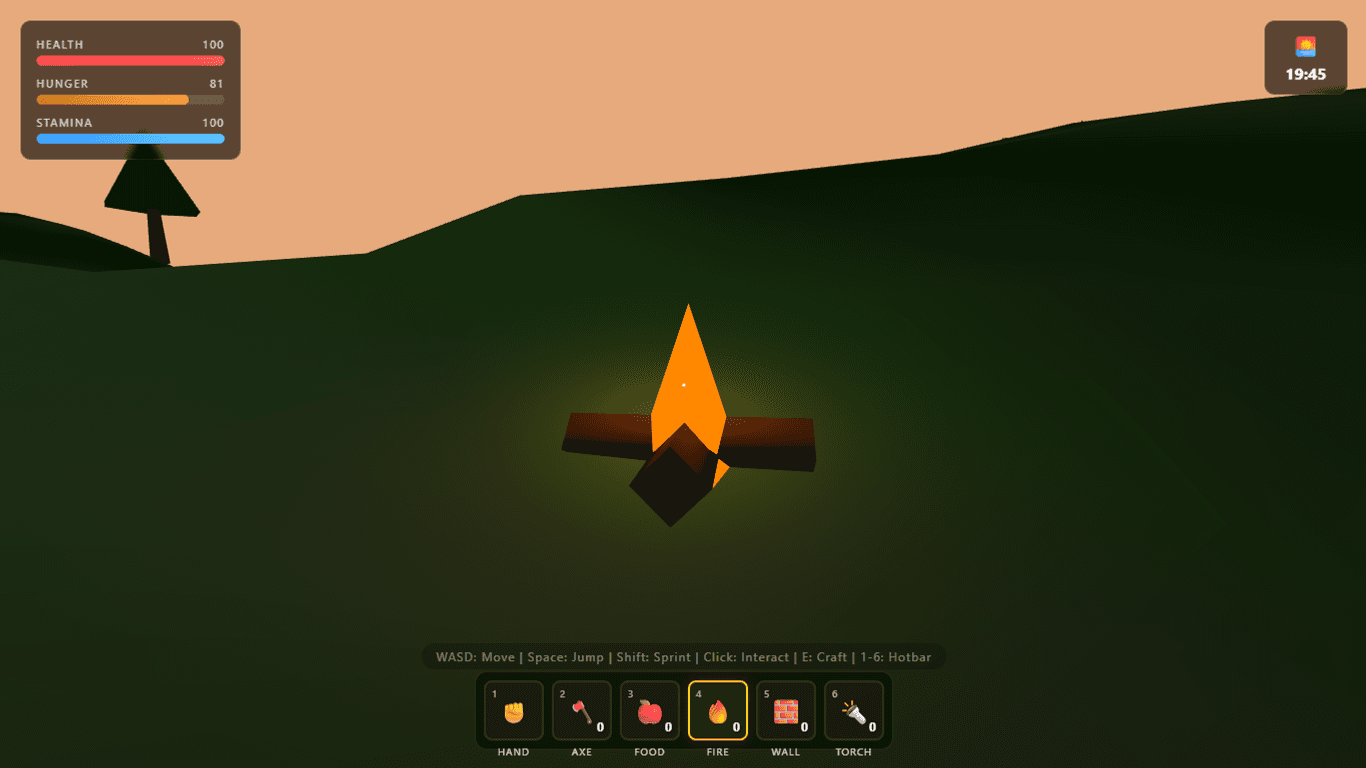 Night Atmosphere and Dynamic Point Lighting from Torch and Campfire
Survival stats and resource harvesting
Health, Hunger, and Stamina bars sit in the top-left. Hunger ticks down steadily; when it hits zero, health starts draining at 2 HP/s. Sprinting and jumping cost stamina, which regenerates at rest. Fall damage triggers when impact velocity exceeds a threshold.
Harvesting uses a raycaster pointed forward from the camera, detecting InstancedMesh objects within 6 units. Clicking a tree deducts 1 HP from it (3 HP with an Axe equipped), flashing it red for 100ms. When a node is depleted it vanishes and starts a 30-second respawn timer, then reappears at the original location. Bushes are one-hit and give berries; rocks need 4 hits for stone.
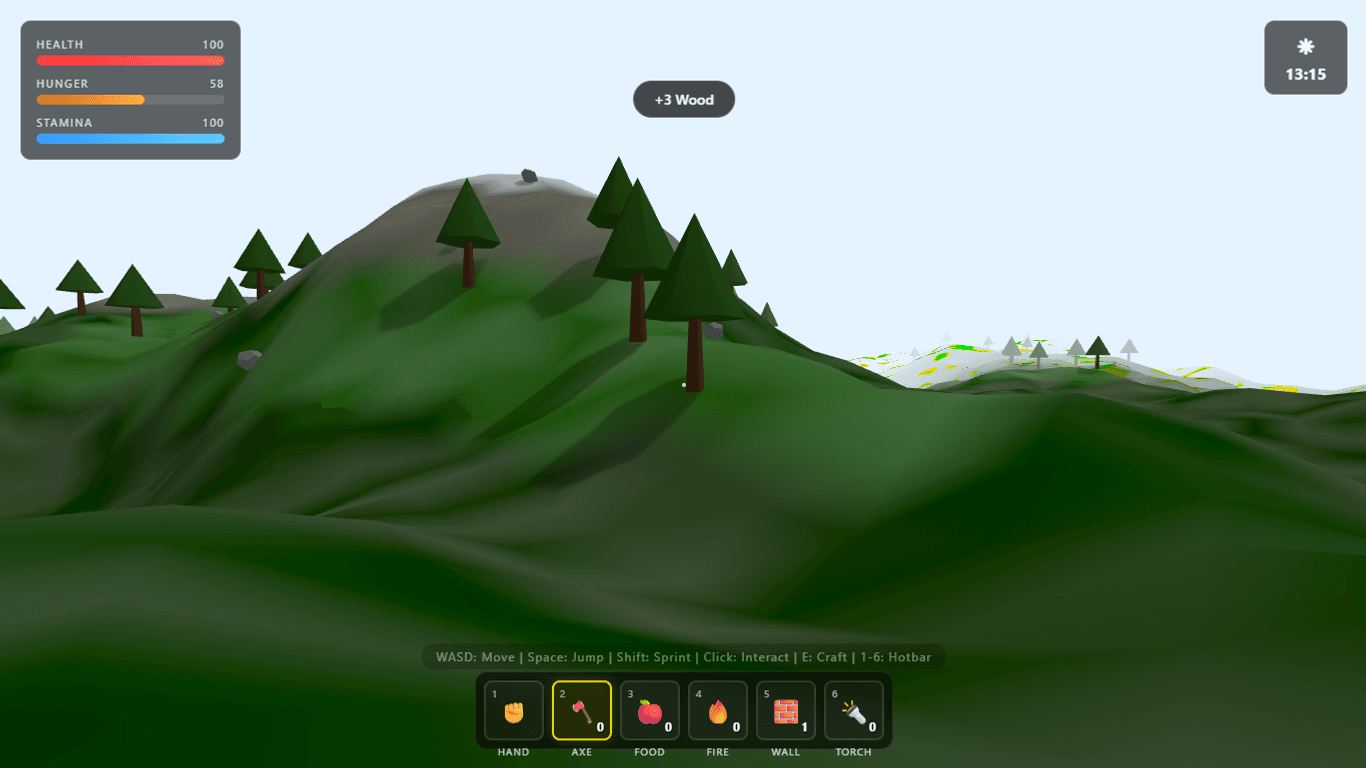 Resource Harvesting Hit Flash and Toast Popup Notification
Crafting and ghost placement
Pressing E exits pointer lock and opens a frosted-glass crafting panel. Recipe validation runs live against current inventory — items you can't afford are grayed out, not hidden.
- Axe (3 Wood, 2 Stone): multiplies tree harvest damage by 3×.
- Campfire (5 Wood, 3 Stone): a 3D log pile with a flickering cone flame and a
PointLight. Eating food within 5 units of a campfire gives +40 hunger instead of +25. - Torch (1 Wood, 1 Stone): spawns a
PointLightoffset from the camera whenever Torch is the active hotbar slot. - Shelter wall (4 Wood): 3×3 wooden slab with AABB collision once placed.
Campfires and walls show a green transparent ghost mesh projected onto terrain via a raycaster before placement. Slope-snapping works correctly — walls place flush with the hillside rather than floating or clipping through it.
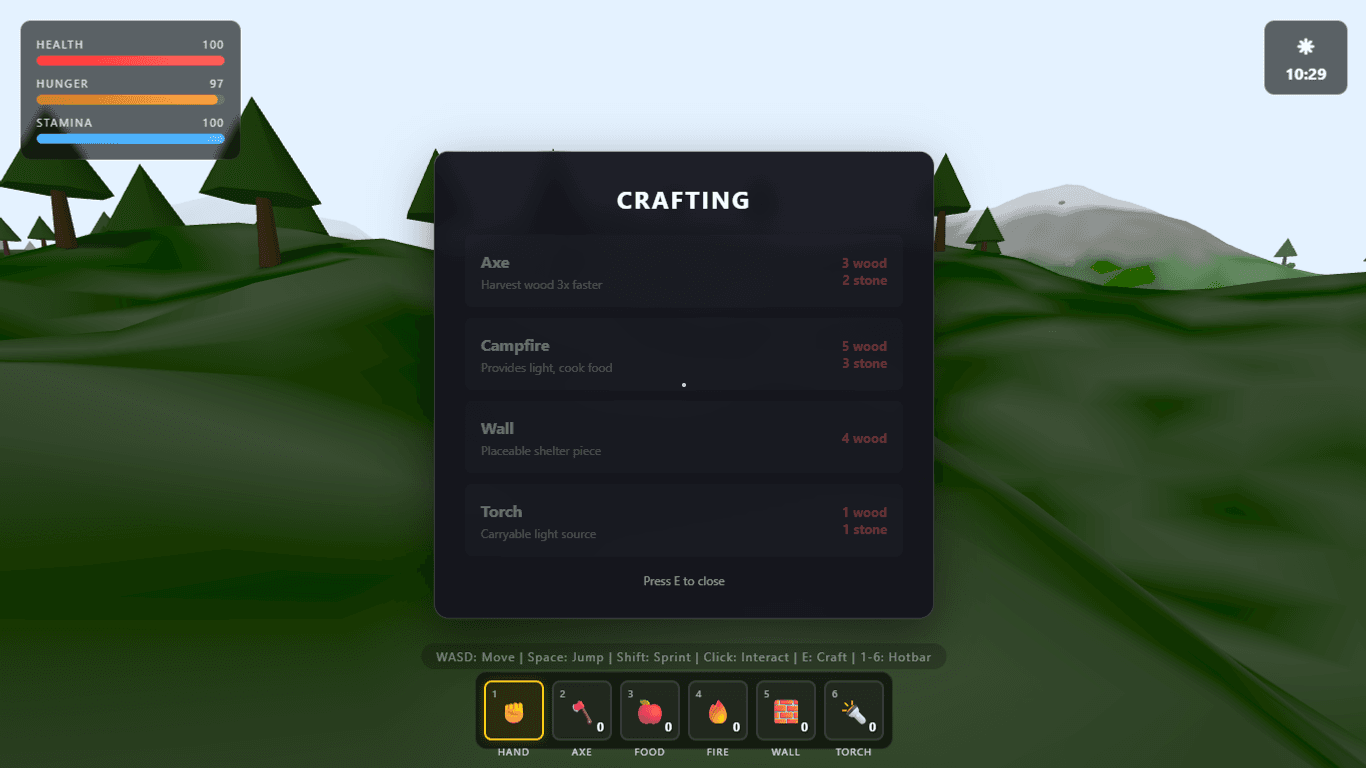 Frosted Glass Crafting Menu with Recipe Requirements
GLM-5.2 coding benchmark results: What impressed me
The ghost mesh placement (updateGhost()) was unprompted — the prompt asked for a "placeable campfire" but didn't specify a preview system. GLM-5.2 added one anyway, casting a ray against terrain geometry each frame and positioning the ghost at the hit point. Small thing, but it's the kind of polish that usually needs a second prompt to appear.
The noise implementation is also worth calling out. Instead of reaching for a library or failing with a "not available" error, it wrote a correct Perlin function from scratch — proper gradient hashing, bilinear interpolation, and a smooth fade curve — in about 40 lines. That same function then drives both terrain elevation and biome color selection using different frequency parameters, which keeps the codebase coherent rather than using two separate generation approaches for the same underlying data.
Instancing is handled correctly throughout. Trees, rocks, and bushes are each a single InstancedMesh call with per-instance matrix transforms — not 1,500 separate add() calls — and the scene holds 60 FPS on a mid-range GPU.
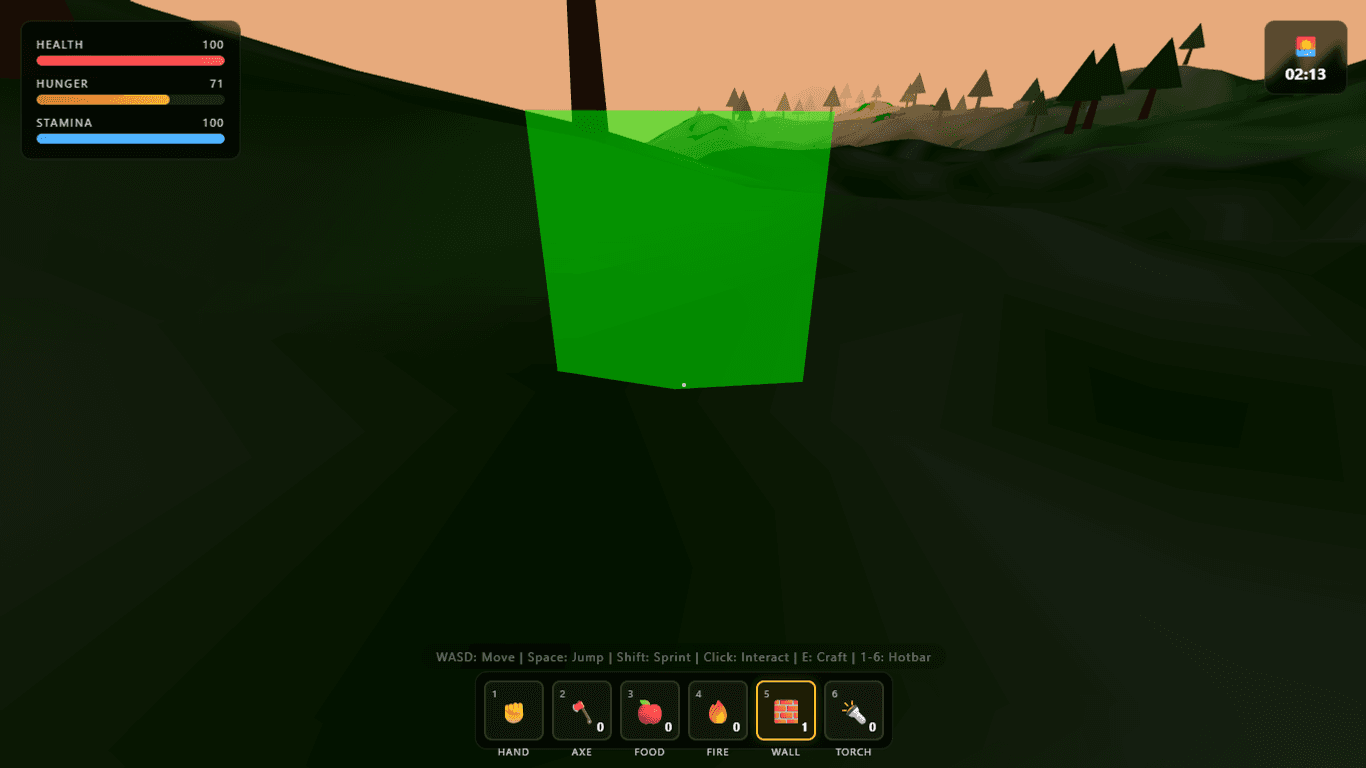 Green Semi-Transparent Ghost Preview Mesh for Shelter Placement
What needs work
- No hostile mobs — the prompt didn't mandate AI enemies, and GLM-5.2 didn't add them on its own. The world is peaceful; starvation and fall damage are the only real threats. A follow-up prompt requesting wolf or zombie AI would test whether the architecture extends cleanly.
- Wall collision is AABB only — placed walls use axis-aligned bounding box collision, not mesh raycasting. Minor clipping is possible at diagonal approach angles.
- No save state — inventory and placed objects reset on page reload or death. There's no localStorage persistence.
Honest assessment
Try it yourself
You are an expert Three.js game developer.
Create a complete first-person open-world survival game in ONE SINGLE HTML FILE.
IMPORTANT:
- Output ONLY one file: index.html
- Put all HTML, CSS, and JavaScript inside this single file.
- Do not use external assets or frameworks (React, TS, etc.).
- Use Three.js from CDN (https://unpkg.com/three@0.160.0/build/three.module.js).
- Must run by double-clicking index.html.
WORLD & TERRAIN:
- Procedurally generate a rolling 3D terrain heightmap using a custom noise function (write it yourself, no library).
- At least 2-3 biome zones with distinct ground colors and vegetation density.
- Scatter harvestable 3D vegetation (trees, rocks, bushes) using InstancedMesh.
CONTROLS & SURVIVAL:
- First-person camera with WASD movement, Space to jump, Shift to sprint, and pointer-lock mouse look.
- Survival HUD: Health, Hunger (drains over time — causes health drain when empty), Stamina (drains sprinting/jumping).
- Resource harvesting: left-click trees for Wood, rocks for Stone, bushes for Berries.
- Crafting system (toggle with E): Craft Axe (3 Wood, 2 Stone), Campfire (5 Wood, 3 Stone), Torch (1 Wood, 1 Stone), Shelter Wall (4 Wood).
- Day/night cycle: ~2-minute cycle, sun/moon orbit, sky and ambient light shift to match.