I prompted GLM 5.2 Deep Think Max to build a Retro Pseudo-3D Raycast FPS Game — 1,521 lines of vanilla JS in one shot

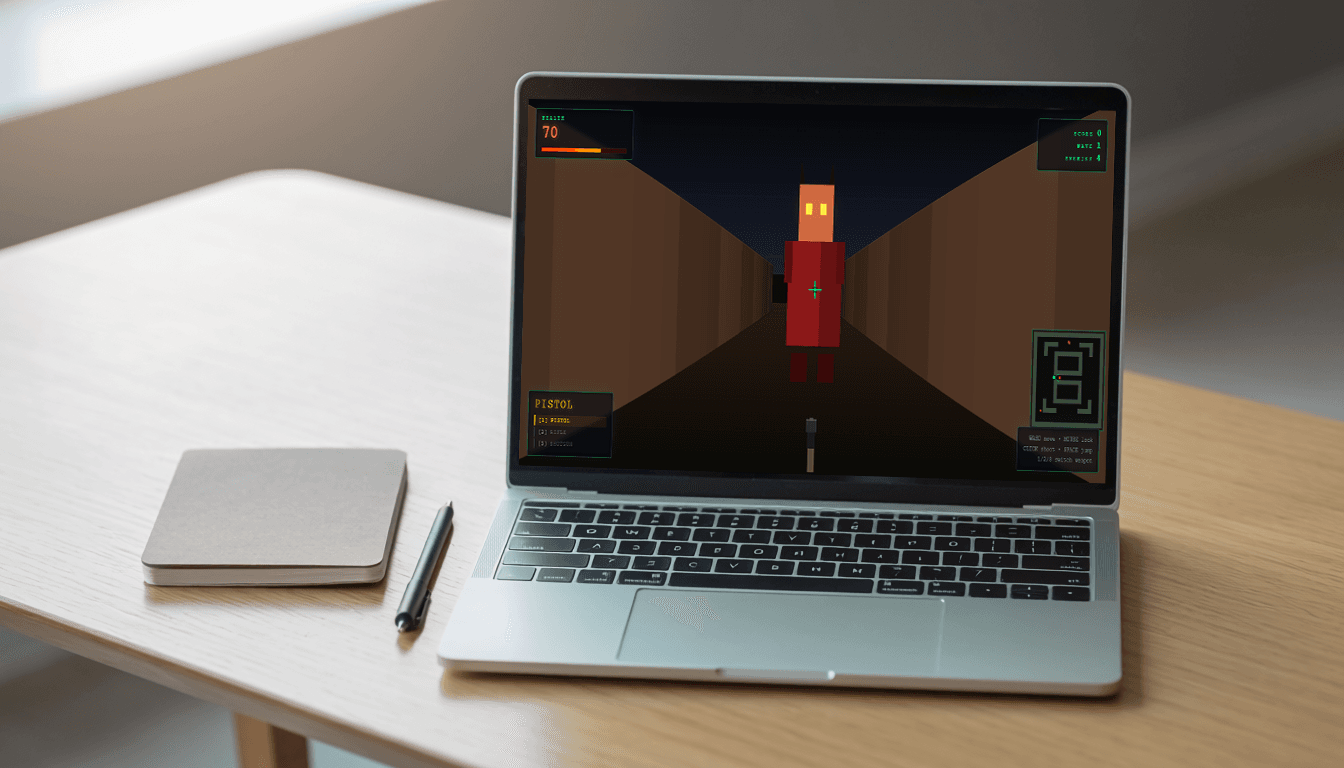
I put GLM 5.2 Deep Think Max to the test in a hands-on glm 5.2 coding evaluation: build a classic wolfenstein 3d style retro raycasting game in a single HTML file. No WebGL, no Three.js, no external audio or image files, no bundlers — just the Canvas 2D API and vanilla JavaScript. What came back was a 1,521-line game with a DDA raycasting engine, three distinct weapons, wave-based bot AI, and every sound effect synthesized live through the WebAudio API.
The core loop works well right out of the gate, but a few systems got sketched into the HUD and code and then never fully wired up — an ammo economy chief among them. Here's the full breakdown, prompt included.
What I asked for: Raycasting game prompt
Here is the exact prompt I gave GLM 5.2 Deep Think Max, unedited:
You are a senior browser game developer.

Build a simple first‑person shooter (FPS) fighting game entirely inside one HTML file (index.html).

Use only HTML + CSS + vanilla JavaScript, no build tools, no external game engines (no Three.js, no Phaser, no Babylon, etc.).Overall requirements
- The entire game must live in a single HTML file:
- Include
<style>and<script>tags inline. - Opening
index.htmlin a modern desktop browser should immediately show a playable FPS game.
- Include
- Use 2.5D / pseudo‑3D via the Canvas API or simple ray‑casting, not full WebGL to keep the code understandable.
- Use keyboard + mouse controls:
W/A/S/Dto move forward / left / backward / right.- Mouse to look around (horizontal rotation).
Spaceto jump.- Left mouse button to shoot.
- Number keys
1,2,3to switch weapons.
Visual & structure guidelines
- Create a full‑screen
<canvas>for the game view and a small HUD overlay using regular HTML elements. - Basic map:
- Simple rectangular arena with walls, obstacles, and a floor.
- Player starts in the center.
- Simple art style:
- Use solid colors and simple shapes (rectangles, circles, lines) for walls, enemies, bullets, etc.
- Do not load any external images or audio files.
Game loop & engine
Implement a standard game loop using requestAnimationFrame:
- Clear → update → draw → repeat.
- Maintain arrays or lists for:
players(only one: the main player).bots/mobs(AI enemies).bullets(projectiles).weapons(definitions of gun stats).
The loop must:
- Read input (keyboard + mouse).
- Update player position, velocity, and rotation with simple collision against walls.
- Update AI bots (movement + decision making).
- Update bullets (movement, collision with bots and walls, damage, and removal).
- Render the scene from the first‑person perspective:
- Use either a very simple ray‑cast style (walls as vertical slices) or a "fake 3D" approach where enemy sprites are scaled based on distance.
- Draw a HUD with health, current weapon name, ammo, and score.
Player
- Properties:
- position (x, y), height, and facing angle.
- health (e.g., 100).
- movement speed, jump capability.
- Behaviors:
- Move with WASD relative to current facing angle.
- Mouse moves the camera horizontally (simple mouselook).
- Keep the camera at player head height.
- Prevent walking through walls using simple AABB checks against the map.
Weapons (multiple weapons)
Implement at least three weapons with different behaviors:
-
Pistol
- Single shot per click.
- Low fire rate.
- Medium damage.
- No spread.
-
Rifle
- Automatic fire while left mouse is held.
- Higher fire rate.
- Lower per‑bullet damage.
- Slight spread (small random offset to direction).
-
Shotgun
- Fires a burst of multiple pellets in a cone.
- Large damage at close range.
- Slow fire rate.
- High spread.
Weapon system:
- Define a
weaponsarray or object containing:namefireRate(shots per second)damagebulletSpeedspread(in radians)bulletsPerShot
- Track
currentWeaponIndex, change with keys1,2,3. - Enforce fire rate via timestamps (
lastShotTime) so the player cannot shoot faster than allowed.
Bullets
- Represent bullets as small objects with:
- position (x, y)
- direction (angle)
- speed
- damage
- owner (player)
- On each frame, move bullets forward.
- Check collision with:
- Walls: destroy the bullet.
- Bots: decrease bot health, destroy bullet, increase player score.
- Optionally draw small 2D hit marker or impact flash for feedback.
AI bots / mobs
Add AI enemies that move and fight:
- Represent each bot with:
- position (x, y)
- health
- speed
- state (
idle,chasing,attacking)
- Behavior:
- If player is within detection radius, switch to
chasing:- Move toward player using simple steering (normalize vector from bot to player).
- Avoid overlapping walls with basic collision checks.
- If player is within attack range and bot has line of sight (simple ray or no wall between), switch to
attacking:- Either:
- Shoot "invisible" bullets that directly reduce player health in timed intervals, or
- Spawn visible bullets moving toward player.
- Either:
- If health ≤ 0, remove bot and increment score.
- If player is within detection radius, switch to
- Spawn several bots around the arena with different starting positions.
- Optionally respawn bots over time to keep the game active.
Difficulty & progression
- Start with a small number of bots and then increase their count or movement speed over time or per score milestone.
- Track:
score(number of bots killed).waveorlevelbased on score thresholds.
- Display these numbers on the HUD.
HUD & UI
Create a simple overlay with:
- Player health bar or numeric health.
- Current weapon name.
- Ammo info (if you implement limited ammo; you can start with infinite).
- Score and wave.
- A small crosshair in the center of the screen (use CSS / canvas drawing).
Game states:
- On start, show an instruction screen ("Click to start, WASD to move, mouse to look, left click to shoot, 1/2/3 to change weapon") and hide it when the player clicks.
- On player death (health ≤ 0):
- Show "Game Over" with final score.
- Provide a "Restart" button that resets all entities and starts a new game.
Code organization (still inside one file)
Inside the single HTML file:
- Keep
<head>minimal: title, meta viewport, basic styles. - In
<body>, include:<canvas id="game">- A
<div id="hud">for text HUD. - A
<div id="overlay">for start / game over messages.
- In the
<script>tag:- Define constants for map size, speeds, etc.
- Define simple classes or factory functions:
PlayerBotBulletWeapon
- Implement:
- Input handling (keyboard + mouse listeners).
- Game initialization.
- The main
update()andrender()functions. - The
gameLoop()function usingrequestAnimationFrame.
- Add small comments near major parts to explain logic, but keep code compact and beginner‑friendly.
Implementation constraints
Do not:
- Use external CSS/JS files or CDNs.
- Use any frameworks or libraries.
- Use ES module imports.
Do:
- Use plain JavaScript in one
<script>block. - Make sure the file runs by simply opening it locally in Chrome/Edge/Firefox.
- Ensure the code is reasonably optimized so the game runs smoothly on a typical laptop.
What GLM 5.2 delivered
Interactive Demo
W A S D / Arrow Keys to drive
GLM even named its own creation: the start screen reads "RAYCAST ARENA" under the tagline "A pseudo-3D arena shooter," and frames the enemies as demon bots you're meant to survive in waves. The code backs that framing up — bot sprites are drawn with small horns and glowing amber eyes, so the visual design actually matches the flavor text instead of shipping as generic reskinned boxes.
Structurally, the script is broken into clear functional blocks — audio synthesis, input handling, game actions, the update loop, DDA raycasting, rendering, HUD sync — rather than one monolithic function. The HUD leans into a green-on-black terminal look with a monospace font and glowing panel borders, which suits a raycast engine better than a generic sci-fi skin would.
Game features breakdown
Raycasting and sprite rendering
GLM implemented a textbook DDA raycasting pipeline:
- Fisheye-corrected wall casting: each screen column's ray angle is derived from the camera plane rather than aimed straight at the player, and distance is measured perpendicular to that plane rather than as a straight-line distance — the standard fix for the "fisheye" bulge naive raycasters suffer from.
- Checkerboard wall shading: walls alternate between two shades based on grid-cell parity, plus a separate tint for north/south versus east/west-facing surfaces, so flat corridors still read as three-dimensional even with solid-color walls.
- Z-buffer billboard clipping: every bot, bullet, and particle is sorted back-to-front by distance, then clipped column-by-column against the same depth values the wall pass wrote — built with a Canvas clip region over per-column visible ranges rather than a manual pixel framebuffer. It's a clever way to get correct occlusion (sprites hiding behind walls) without reimplementing Canvas's rasterizer from scratch.
Weapons and combat
All three weapons are genuinely differentiated in the underlying data, not just by name:
Fire rate is enforced through a lastShotTime timestamp check rather than a simple cooldown flag, so holding down the rifle's auto-fire can't outpace its stated rate even under frame-rate hitches. The shotgun's wide pellet cone makes it devastating at close range and nearly useless at distance, which is the correct tradeoff for the archetype.
Bot AI and wave scaling
Each bot cycles through three states — idle, chasing, attacking — gated by distance and an actual line-of-sight raycast that samples points along the line between bot and player and bails the moment any sample lands inside a wall. A bot only opens fire once it's close, has line of sight, and its own attack cooldown has elapsed, so it can't shoot through walls despite always knowing exactly where the player is.
Difficulty scales cleanly with wave number: bot health grows with each wave, movement speed inches up against a hard cap, and spawn count increases toward a ceiling of 20 concurrent bots. Nothing here is randomized chaos — it's a deliberately tuned curve rather than just "more enemies, more damage."
Synthesized sound effects
There's zero audio-asset dependency — every sound is generated live via WebAudio oscillators and one noise-buffer burst:
- Weapon switch: a short, high sine blip.
- Pistol: a decaying square wave.
- Rifle: a fast sawtooth sweep dropping in pitch.
- Shotgun: a filled noise buffer layered under a low square-wave thump.
- Bot hit, bot death, and wave start: distinct pitched blips, so combat has audio feedback without a single WAV or MP3 file anywhere in the project.
function blip(freq, dur, type = 'square', vol = 0.06, freqEnd = null) {
    if (!audioCtx) return;
    const osc = audioCtx.createOscillator();
    const gain = audioCtx.createGain();
    osc.type = type;
    osc.frequency.setValueAtTime(freq, audioCtx.currentTime);
    if (freqEnd !== null) osc.frequency.exponentialRampToValueAtTime(Math.max(1, freqEnd), audioCtx.currentTime + dur);
    gain.gain.setValueAtTime(vol, audioCtx.currentTime);
    gain.gain.exponentialRampToValueAtTime(0.0001, audioCtx.currentTime + dur);
    osc.connect(gain).connect(audioCtx.destination);
    osc.start();
    osc.stop(audioCtx.currentTime + dur);
}
Weapon viewmodel and feedback
The equipped weapon renders as hand-drawn 2D vector shapes at the bottom of the screen rather than a sprite image — the pistol has a visible slide and grip, the rifle has a stock and magazine, the shotgun has dual barrels and a pump. All three kick back on fire using the same timer that drives the muzzle flash, sway with movement on the same sine wave that drives head-bob, and flash a radial gradient at the muzzle sized to how much of the fire animation remains.
The minimap in the corner adds a field-of-view cone and color-codes bots by state, which is a genuinely useful piece of information design most one-shot game prompts don't think to ask for — here it came from the prompt's "dynamic minimap" line paying off exactly as intended. Pointer-lock loss (tabbing away, hitting Escape) is also handled cleanly with a pause overlay rather than leaving input in a broken state.
GLM 5.2 coding benchmark results: What impressed me
The DDA raycaster is mathematically correct, not just visually convincing — the fisheye correction and perpendicular-distance math are textbook, and the z-buffer clipping trick for sprite occlusion is a legitimately elegant solve for a problem (2D canvas has no native depth buffer) that a lot of raycasting tutorials fumble or skip entirely. Getting three weapons to feel distinct through data alone — fire rate, spread, pellet count — rather than through separate hand-tuned animations is also a good sign the model was reasoning about game feel rather than pattern-matching "FPS equals gun that shoots."
The small authorial touches stood out too: GLM titled its own game, wrote flavor text for the enemies, and then made the enemy sprites visually match that flavor text — horns, glowing eyes — entirely unprompted. None of that was in the spec.
What needs work
- No ammo system, despite the HUD implying one. The prompt explicitly allowed infinite ammo, so this isn't a spec violation — but a reload key is wired into the input handler with a comment marking it "reserved" and does nothing, which suggests a reload system was planned and then abandoned mid-generation.
- An unused pickups array. It's declared right alongside the bots, bullets, and particles arrays, but nothing in the entire file ever pushes to it or reads from it — a health or ammo pickup system that got scaffolded and then dropped.
- Bots only attack at range. Every "attacking" state spawns a projectile, even when a bot is standing directly on top of the player, so there's no melee lunge or contact damage — encounters play out identically whether a bot is six units away or six inches away.
- "Object pooling" would be a stretch. This prompt didn't ask for pooling the way the zombie survival build's did, and GLM didn't add it unprompted here — bots are spliced out and new ones pushed in, which is fine at a 20-bot ceiling but wouldn't scale gracefully if that cap were raised.
Honest assessment
Try it yourself
You are a senior browser game developer.
Build a simple first-person shooter (FPS) fighting game entirely inside one HTML file.
Requirements:
- Single HTML file with styling and scripts inline, no CDNs, no frameworks.
- Retro Wolfenstein-style pseudo-3D raycast rendering on HTML5 Canvas using DDA.
- Keyboard + mouse look via the Pointer Lock API, WASD movement, and jump.
- 3 weapons with genuinely different stats: Pistol (precise), Rifle (automatic, spread), Shotgun (pellet cone).
- AI enemies with idle/chasing/attacking states gated by line-of-sight, not just distance.
- Wave-based difficulty scaling for enemy health, speed, and count.
- Dynamic minimap showing the player's FOV cone and enemy state by color.
- All sound effects synthesized with the Web Audio API — no audio files.
- Damage vignette, hitmarkers, and a HUD with health, score, and wave number.