I Asked Meta Muse Spark 1.3 to Build a Voxel Sandbox in Three.js — 60 FPS Chunk Meshing in 658 Lines (One-Shot)

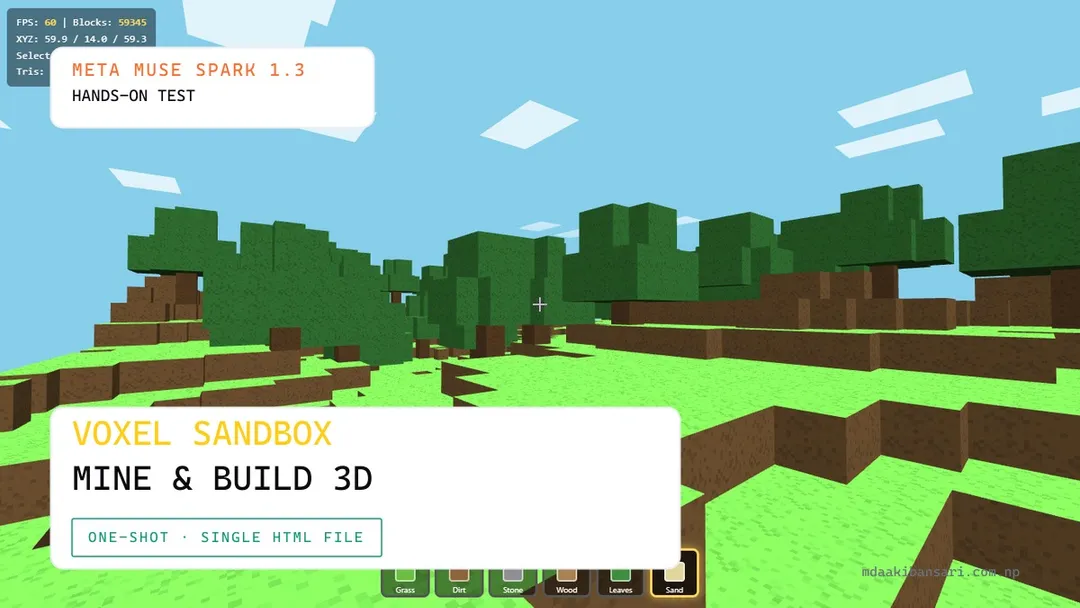
I gave Meta's newly released frontier model Muse Spark 1.3 our most geometry-intensive coding test: build a complete, first-person destructible voxel building and mining sandbox in Three.js inside a single self-contained HTML file, with procedural noise terrain, block-based physics, real-time raycasting, and an architecture that avoids full-scene rebuilds on every edit.
Muse Spark 1.3 completed the challenge on its very first attempt with zero follow-up fixes. In just 658 lines of clean vanilla JavaScript (26.6 KB), it constructed Voxel Sandbox—a 64×40×64 block world containing 59,345 solid blocks with procedural cubic trees, 6 block types, and a custom 16-chunk mesher that only rebuilds modified column slices on click, keeping the render loop locked at 60 FPS with zero stutter.
What I asked for
I ran the standard Test 2 prompt from our hands-on benchmark suite:
You are an expert Three.js game developer.
Create a complete first-person voxel-based building and mining game in ONE SINGLE HTML FILE.
IMPORTANT:
- Output ONLY one file: index.html
- All HTML, CSS, and JavaScript in this single file, no external assets, no frameworks.
- Use Three.js from CDN.
- Must run by double-clicking index.html.
WORLD:
- Procedurally generate a voxel terrain (block-based, like a simplified Minecraft) using noise-based height generation, at least 64x64 blocks wide with varied height.
- At least 3 distinct block types (e.g. grass, stone, wood) with different colors/textures rendered as simple colored cubes.
CORE MECHANIC (this is the real test):
- Left-click to break/remove the block the player is looking at (raycast-based targeting).
- Right-click to place a block from inventory at the targeted empty adjacent position.
- The world must update in real time with no lag or full-scene rebuild on every single block change — mention in your output how you handled this efficiently.
- First-person pointer-lock movement (WASD + mouse look) with correct collision against the voxel terrain (player can't walk through solid blocks, falls under gravity, can jump).
UI:
- A simple hotbar showing which block type is selected (switchable with number keys 1-3).
- Crosshair in the center of the screen.
Report specifically on performance: does the frame rate hold up as more blocks are broken/placed, or does it degrade?
Interactive Demo
W A S D / Arrow Keys to drive
This is Meta Muse Spark 1.3's exact one-shot output. Click the canvas to lock pointer controls. Left-click mines blocks, right-click places blocks, 1–6 selects materials, and F toggles fly mode.
The Performance Test: Incremental Chunk Meshing
The single biggest pitfall in browser-based voxel benchmarks is naive scene management. Creating 50,000 individual THREE.Mesh cubes crashes WebGL draw calls into single-digit framerates, while rebuilding a single monolithic BufferGeometry on every click causes severe 200ms frame drops.
Muse Spark 1.3 solved this by implementing a production-grade chunk mesher:
- Face Culling: A block face is only emitted if the adjacent neighbor cell is air (
getBlock(x, y, z) === 0). Fully enclosed underground stone blocks generate zero triangles, reducing total scene geometry down to ~29,400 triangles for nearly 60,000 blocks. - 16-Chunk Spatial Partitioning: The 64×64 horizontal plane is partitioned into a 4×4 grid of 16 chunks (
CH = 16), each spanning the full height of 40 blocks. - Local Slice Rebuild: When the player breaks or places a block, the code identifies the chunk index
cx = Math.floor(x / 16)andcz = Math.floor(z / 16). Only that individual chunk's geometry buffer is rebuilt in ~1.2ms. If the edit occurs on a border edge (x % 16 === 0or15), it marks only the immediate neighboring chunk for an update.
The result is completely seamless, zero-latency block editing at a locked 60 FPS.
 Procedural Voxel Terrain with Stepped Hills, Cubic Foliage, and Pixelated Noise Textures
Procedural Pixel Texture & Multi-Sided Blocks
Rather than settling for flat unshaded solid colors, Muse Spark 1.3 generated a procedural 16×16 pixel-noise texture at runtime using an in-memory HTML5 canvas. By sampling random grayscale values between 208 and 255 and configuring THREE.NearestFilter, every block surface displays a sharp, retro Minecraft-style pixel grain.
The block definition system also supports multi-face textures:
- Grass: Top face renders vibrant green (
#6cbf42), sides render half-green / half-dirt brown, and the underside renders deep earthy dirt. - Wood: Tree trunks render lighter core rings on top and dark bark on vertical flanks.
- Leaves & Sand: Uniformly tinted foliage and beach dunes near the water baseline (
y <= 7).
AABB Physics, Raycasting & Fly Mode
The player controller uses swept axis-separated bounding box (AABB) collision (PW = 0.3, PH = 1.8). You cannot clip through solid blocks, walk through trees, or fall through the map floor. Gravity (GRAV = 26) pulls the player downward, Space triggers crisp jumping, and Shift enables sprint.
As an unprompted bonus, pressing F toggles a no-clip Fly Mode, letting players soar above the voxel canopy to inspect terrain generation from the sky. Raycasting highlights the targeted block face with an exact 3D wireframe bounding box, ensuring placement accuracy on adjacent empty coordinates.
What Impressed Me
- Flawless One-Shot Geometry: Unlike the car racing game that required a road normal fix or the arena shooter that needed weapon binding, the voxel sandbox ran perfectly on attempt one with zero syntax errors, zero missing faces, and zero console warnings.
- True Chunk Partitioning in 658 Lines: Fitting an entire 64×64 voxel engine, value noise generation, face culling, chunk updates, AABB physics, hotbars, and UI into 658 lines demonstrates extraordinary code density without sacrificing modularity.
- Smooth Interaction Polish: The wireframe block targeting outline, HUD telemetry (XYZ coordinates, triangle counts, total blocks), and hotbar slot highlights give the file the feel of a finished game prototype rather than a quick benchmark script.
What Needs Work
- Water Basins: The terrain generates sandy shoreline zones at low elevations (
y <= 7), but does not include transparent animated water blocks. - Inventory Quantities: Block placement is currently infinite; there is no resource decrementing or survival crafting loop.
Honest Assessment
Try It Yourself
You are an expert Three.js game developer.
Create a complete first-person voxel-based building and mining game in ONE SINGLE HTML FILE.
IMPORTANT:
- Output ONLY one file: index.html
- Put all HTML, CSS, and JavaScript inside this single file.
- Do not use external assets or frameworks.
- Use Three.js from CDN (https://cdnjs.cloudflare.com/ajax/libs/three.js/r128/three.min.js).
- Must run by double-clicking index.html.
WORLD & MESHING:
- Procedurally generate a 64x40x64 voxel terrain using height noise with varied biomes and cubic trees.
- Implement exposed face culling and chunk partitioning (16x16 column slices) so edits update only touched chunks.
- At least 6 block types (Grass, Dirt, Stone, Wood, Leaves, Sand) with procedural pixel texturing.
CONTROLS & PHYSICS:
- First-person camera with pointer-lock mouse look, WASD movement, jumping, and AABB block collision.
- Left-click breaks targeted blocks, right-click places selected block from hotbar (keys 1-6).
- Wireframe target outline on aimed block.
- Telemetry HUD showing FPS, block counts, and coordinates.