I Prompted Ox Alpha to Build a 3D Voxel Island Explorer — One Bug Found, One Prompt to Fix It

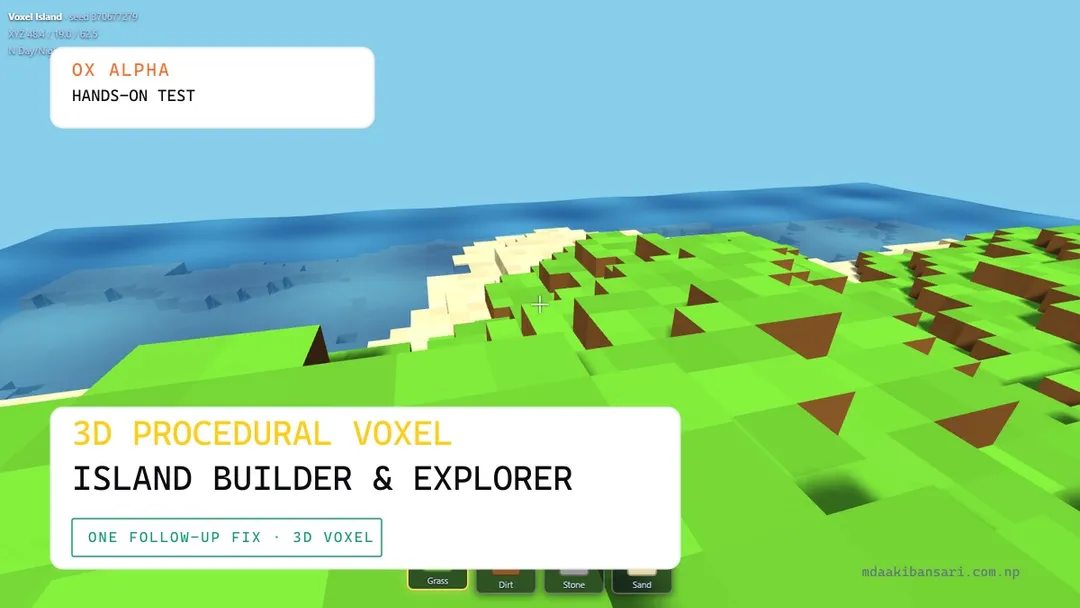
The fourth genre in our Ox Alpha test round is a Minecraft-style voxel sandbox — procedural island terrain, block mining and placement, and a full block-based rendering pipeline. Unlike the other three tests in this round, this one didn't land as a clean one-shot: we hit a real, reproducible bug, and this article covers both the initial result and the fix.
What I asked for
You are an expert WebGL engineer specializing in procedural generation and Three.js.
Build a complete, fully playable, single-file HTML/JS 3D Voxel Island Explorer game.
Requirements:
- Single File: Self-contained index.html.
- CDN: Load Three.js (r128). Zero external textures or sound files.
- Procedural Voxel World:
- Procedural island generated using 2D/3D Perlin/Simplex noise or custom heightmap math.
- Voxel block types: Grass, Dirt, Stone, Sand, and animated Water surface.
- InstancedMesh or chunk-based rendering for high performance.
- Player Controller:
- First-person camera with Pointer Lock controls (WASD + Mouse look + Space jump).
- Raycast block interaction: Left-Click to mine/break block, Right-Click to place block.
- Bounding-box or simple gravity/voxel collision detection.
- Procedural Audio (Web Audio API):
- Procedural footsteps on grass/stone, block pop sound on destroy, place thump, and soothing pentatonic synth background arpeggios.
- UI:
- Crosshair, Hotbar selector (1-4 keys), Inventory count, and Day/Night cycle toggle.
Output only complete, working HTML code.
Interactive Demo
W A S D / Arrow Keys to drive
This demo reflects the post-fix version. WASD to move, Space to jump/swim, left-click to mine, right-click to place, 1-4 or the scroll wheel to select a block.
The bug: grass and dirt rendering identically
In our first playtest, grass and dirt blocks were visually indistinguishable once placed in the world — both showed the same brown color, even though the hotbar icons for Grass and Dirt were correctly differentiated (green vs. brown).
Looking at the generated BLOCK_DEFS object explains exactly why: Grass was defined with top: 0x6abe30 (green) but side: 0x8a5a2b and bottom: 0x7a4f26 — and Dirt was defined with top, side, and bottom all set to that same 0x8a5a2b brown. Grass's side faces and Dirt's every face used the identical hex color. From directly above, grass blocks looked correctly green; from any angle showing a side face — which is most angles during normal exploration — a grass block and a dirt block were visually the same color. The hotbar icons likely only render each block's top color, which is why the bug wasn't visible in the UI, only in the actual world.
The fix
why both grash and dirt block is same fix it rest is ok
One follow-up prompt, and the fix landed cleanly — Grass's side color was changed to a distinct dirt-with-grass-fringe brown separate from plain Dirt's color, so the two block types read as visually different from any viewing angle, including from the side. No other systems were touched or regressed by the fix.
Terrain and world generation
Island shape comes from a radial falloff mask multiplied against a custom from-scratch Simplex noise implementation (gradient table, corner contribution, skewing/unskewing — a real Simplex noise port, not a Perlin approximation dressed up). A second, lower-frequency noise layer adds broader elevation variation on top of the base falloff, and height is clamped and combined per-column into a heightmap before voxels are populated column-by-column with the appropriate block type based on depth from the surface (grass/sand crust, dirt subsurface, stone core).
Rendering is per-block-type InstancedMesh grouping — every visible Grass block in the world is one draw call, same for Dirt, Stone, and Sand — with face culling that only adds a block to the render list if at least one neighboring cell is air or water. This means the whole solid mesh gets fully rebuilt (rebuildSolids()) any time a block is mined or placed, which is a reasonable trade-off for a single-file demo but does mean edit latency scales with total exposed-block count rather than being purely local to the edited region.
Player physics and voxel raycasting
Movement uses axis-separated collision — X, then Z, then Y are each tested and resolved independently against the voxel grid rather than as one combined 3D sweep, which is a simpler and more standard approach for blocky-world collision and avoids diagonal-wall tunneling. Mining and placing use a proper DDA (digital differential analyzer) voxel raycast rather than sampling along the ray at fixed intervals, which means block selection is pixel-accurate even at a shallow grazing angle against a face.
Water has real swimming physics — reduced gravity, a soft velocity cap, and an upward kick on Space — layered on top of the same movement code path rather than being a separate state machine, and the water surface itself is a custom vertex-shader plane that displaces vertices with layered sine waves for a genuinely animated (not just tinted) surface.
What impressed me
The DDA voxel raycast is worth calling out specifically — it's the textbook-correct algorithm for this exact problem (stepping through a voxel grid along a ray, tracking which axis to advance based on which boundary is closer), and it's not the naive approach most one-shot voxel games default to.
The fact that the fix for the grass/dirt bug was a single, minimal, well-targeted change — updating one color value rather than restructuring the block-definition system — suggests the underlying architecture was sound and the bug really was a simple oversight in the initial color table, not a deeper structural issue.
What needs work
- Grass/dirt color collision — the bug covered above. Fixed in one follow-up prompt, but worth noting this was the only genre in this test round where the base one-shot needed a correction at all.
- Full-mesh rebuild on every edit — mining or placing a single block triggers a full re-scan and rebuild of that block type's
InstancedMesh. Fine at this world size (96×40×96), but wouldn't scale cleanly to a much larger explorable area without chunking. - Only one effort tier tested — consistent with the rest of this round, this run used High only.
Honest assessment
Try it yourself
You are an expert WebGL engineer specializing in procedural generation and Three.js.
Build a complete, fully playable, single-file HTML/JS 3D Voxel Island Explorer game.
Requirements:
- Single File: Self-contained index.html. Load Three.js (r128) from CDN. Zero external textures or sound files.
- Procedural Voxel World: Procedurally generate an island using Perlin/Simplex noise or custom heightmap math. Block types: Grass, Dirt, Stone, Sand, animated Water surface — make sure each block type is visually distinct from every viewing angle, not just from directly above. Use InstancedMesh or chunk-based rendering.
- Player Controller: First-person camera with Pointer Lock (WASD + mouse look + Space jump). Raycast block interaction: left-click to mine, right-click to place. Voxel collision detection.
- Procedural Audio: Footsteps that vary by surface, block pop on destroy, place thump, soothing pentatonic ambient arpeggios.
- UI: Crosshair, hotbar selector (1-4 keys), inventory count, day/night cycle toggle.